Imagine you have built a simple Spring Boot API.
It works perfectly.
You test it with 10 users:
Request → API → Database → ResponseEverything looks great. 😎
Then suddenly...
Your application goes viral.
Instead of 10 users, 1 million users start hitting your API.
And now your simple architecture starts looking very different.
10 Users↓
Your API
↓
Everything works 😎
But:
1,000,000 Users
↓
Your API
↓
💥
So what actually happens when millions of users hit an API at the same time?
And more importantly:
How do we design the system so that it doesn't crash?
Let's understand it step by step.
🧠 1. First, Understand the Problem
Suppose we have this API:
GET /api/productsA normal request looks like:
User↓
Spring Boot API
↓
Database ↓ Response
Let's say one request takes around:
100 msThat's perfectly fine for a small application.
But now imagine:
1,000,000 userstrying to access the API.
The problem isn't simply:
"Can Spring Boot handle 1 million users?"
The real question is:
Can every layer behind the API handle that traffic?
Because your API isn't alone.
There may be:
- Load balancers
- API gateways
- Application servers
- Databases
- Redis
- Message queues
- External APIs
- Storage systems
A bottleneck in any one of them can affect the entire application.
🚦 2. The First Problem: Too Many Requests
Let's start with the simplest architecture:
1 Million Users↓
Spring Boot
↓
Database
Now imagine all 1 million users send requests at almost the same time.
The application server has a limited number of:
- CPU cores
- memory
- threads
- database connections
- network bandwidth
So eventually requests start waiting.
Request 1 → ProcessingRequest 2 → Processing
Request 3 → Waiting
Request 4 → Waiting
Request 5 → Waiting
Request 999999 → Waiting
Eventually:
Latency↑
CPU
↑
Memory
↑
Connection Pool
↑
Errors
↑
And finally...
💥 Service UnavailableThis is why "just increase the server size" isn't a complete scaling strategy.
⚡ 3. Horizontal Scaling Comes to the Rescue
Instead of running one huge server:
Users ↓ One Giant Serverwe can run multiple application instances.
                    ┌──────────────┐
                    │    Users     │
                    └──────┬───────┘
                           │
                           ▼
                 ┌──────────────────┐
                 │  Load Balancer   │
                 └────────┬─────────┘
                          │
             ┌────────────┼────────────┐
             │            │            │
             ▼            ▼            ▼
      ┌────────────┐ ┌────────────┐ ┌────────────┐
      │  Server 1  │ │  Server 2  │ │  Server 3  │
      └─────┬──────┘ └─────┬──────┘ └─────┬──────┘
            │              │              │
            ▼              ▼              ▼
      ┌────────────┐ ┌────────────┐ ┌────────────┐
      │Spring Boot │ │Spring Boot │ │Spring Boot │
      │ Application│ │ Application│ │ Application│
      └────────────┘ └────────────┘ └────────────┘
Now traffic is distributed.
For example:
1,000,000 RequestsServer 1 → 330,000
Server 2 → 335,000
Server 3 → 335,000
This is called horizontal scaling.
Instead of making one machine bigger, we add more machines.
⚖️ 4. What Does the Load Balancer Actually Do?
The load balancer sits between users and your application servers.
                 ┌─────────────┐
                 │    Users    │
                 └──────┬──────┘
                        │
                        ▼
              ┌─────────────────┐
              │  Load Balancer  │
              └────────┬────────┘
                       │
          ┌────────────┼────────────┐
          │            │            │
          ▼            ▼            ▼
     ┌─────────┐  ┌─────────┐  ┌─────────┐
     │  App 1  │  │  App 2  │  │  App 3  │
     │ Spring  │  │ Spring  │  │ Spring  │
     │  Boot   │  │  Boot   │  │  Boot   │
     └─────────┘  └─────────┘  └─────────┘
Its job is to decide:
Which server should handle this request?
There are different load-balancing strategies.
For example:
Round Robin
Request 1 → Server 1Request 2 → Server 2
Request 3 → Server 3
Request 4 → Server 1
Or the load balancer may consider:
- server health
- current connections
- latency
- capacity
The important thing is that users don't need to know which application server is handling their request.
🛡️ 5. API Gateway Adds Another Layer
At large scale, we often put an API Gateway in front of backend services.
Users↓
Load Balancer
↓
API Gateway
↓
Microservices
The gateway can handle things like:
- authentication
- authorization
- routing
- rate limiting
- request validation
- logging
For example:
/api/users/** → User Service/api/orders/** → Order Service
/api/products/** → Product Service
Now clients don't need to directly communicate with every backend service.
🚨 6. Rate Limiting Becomes Extremely Important
Now imagine one user sends:
10 requests/secondThat's probably okay.
But what if someone sends:
100,000 requests/secondYour system doesn't know whether it's:
- a real traffic spike
- a badly written client
- a bot
- an attack
This is where rate limiting helps.
For example:
User → API GatewayAllowed:
100 requests/minute
After limit:
429 Too Many Requests
Conceptually:
User↓
Rate Limiter
↓
Within Limit? ── Yes → API
│
No
↓
429 Response
Rate limiting protects your backend from unnecessary traffic.
🧠 7. But What If Every Request Hits the Database?
This is where many applications get into trouble.
Imagine:
1 Million Requests↓
1 Million Database Queries
That's a lot of work.
Suppose the API is:
GET /api/productsand product data doesn't change every second.
Why should every request hit the database?
Instead, we can introduce a cache.
User↓
API
↓
Redis
↓
Database
The flow becomes:
                    ┌───────────┐
                    │  Request  │
                    └─────┬─────┘
                          │
                          ▼
                  ┌───────────────┐
                  │  Check Cache  │
                  └───────┬───────┘
                          │
                 ┌────────┴────────┐
                 │                 │
               Cache Hit        Cache Miss
                 │                 │
                 ▼                 ▼
              ┌──────┐       ┌──────────┐
              │ Data │       │ Database │
              └──────┘       └────┬─────┘
                                   │
                                   ▼
                              ┌─────────┐
                              │  Cache  │
                              └────┬────┘
                                   │
                                   ▼
                                ┌──────┐
                                │ Data │
                                └──────┘
Now thousands or millions of requests can potentially be served from memory instead of repeatedly querying the database.
⚡ 8. Caching Can Change Everything
Imagine:
Without Cache 1,000,000 Requests
│
▼
┌───────────────┐
│ Application │
└───────┬───────┘
│
▼
1,000,000 DB Queries
│
▼
┌─────────┐
│ Database│
└─────────┘
With caching:
                1,000,000 Requests
                        │
                        ▼
                 ┌────────────┐
                 │   Redis    │
                 │   Cache    │
                 └─────┬──────┘
                       │
              ┌────────┴────────┐
              │                 │
             Hits             Misses
              │                 │
              ▼                 ▼
          ┌────────┐       ┌──────────┐
          │Response│       │ Database │
          └────────┘       └────┬─────┘
                                │
                                ▼
                             Response
If most requests are cache hits, the database receives dramatically less traffic.
This is why caching is one of the first things engineers consider when dealing with read-heavy workloads.
But there's a catch.
🧹 9. Cache Invalidation Is Hard
Suppose Redis contains:
Product 101 Price = ₹999Then the database changes:
Price = ₹899But Redis still has:
₹999Now users receive stale data.
This is the famous problem:
How do we keep the cache and database consistent enough for our requirements?
There isn't one universal answer.
Depending on the use case, you may use:
- TTL
- cache eviction
- explicit invalidation
- cache-aside pattern
- write-through strategies
For example:
Database Updated ↓ Invalidate Cache ↓ Next Request ↓ Database ↓ New Value → Cache🗄️ 10. Now the Database Becomes the Bottleneck
Suppose we've already scaled our application:
                  ┌─────────────────┐
                  │  Load Balancer  │
                  └────────┬────────┘
                           │
              ┌────────────┼────────────┐
              │            │            │
              ▼            ▼            ▼
        ┌──────────┐ ┌──────────┐ ┌──────────┐
        │  App 1   │ │  App 2   │ │  App 3   │
        └─────┬────┘ └─────┬────┘ └─────┬────┘
              │            │            │
              └────────────┼────────────┘
                           │
                           ▼
                    ┌────────────┐
                    │  Database  │
                    └────────────┘
We have 100 application servers.
But only one database.
Now we've simply moved the bottleneck.
100 App Servers↓
One Database
↓
💥
This is an extremely common scaling problem.
Adding application servers doesn't automatically make the database faster.
📖 11. Read Replicas Can Help
If the application performs many reads, we can introduce read replicas.
                 ┌─────────────────┐
                 │   Application   │
                 └────────┬────────┘
                          │
                          ▼
                   ┌────────────┐
                   │ Primary DB │
                   └──────┬─────┘
                          │
                 ┌────────┴────────┐
                 │                 │
                 ▼                 ▼
          ┌────────────┐    ┌────────────┐
          │  Replica 1 │    │  Replica 2 │
          └────────────┘    └────────────┘
Writes go to the primary:
INSERT UPDATE DELETE↓
Primary DB
Reads can be distributed:
SELECT↓
Replica 1 / Replica 2
This allows read traffic to scale more effectively.
Of course, replication introduces its own considerations, such as replication lag.
🔥 12. Database Sharding
What if even one primary database isn't enough?
Then we may need to distribute the data itself.
For example:
                    ┌─────────────┐
                    │    Users    │
                    └──────┬──────┘
                           │
                           ▼
                    ┌─────────────┐
                    │  Shard Key  │
                    └──────┬──────┘
                           │
              ┌────────────┼────────────┐
              │            │            │
              ▼            ▼            ▼
        ┌──────────┐ ┌──────────┐ ┌──────────┐
        │ Shard 1  │ │ Shard 2  │ │ Shard 3  │
        └──────────┘ └──────────┘ └──────────┘
Suppose users are distributed by user ID:
User 1 → Shard 1User 2 → Shard 2
User 3 → Shard 3
Now different databases handle different portions of the data.
This is called database sharding.
But sharding isn't something you add casually.
It creates additional complexity around:
- data distribution
- cross-shard queries
- transactions
- rebalancing
- hot partitions
So it should be introduced when the workload actually requires it.
📨 13. Don't Make the User Wait for Everything
Here's another common mistake.
Suppose a user uploads an order.
After creating the order, your application also needs to:
- send an email
- generate a report
- update analytics
- send a notification
- update another service
If everything happens synchronously:
API Request↓
Create Order
↓
Send Email
↓
Generate Report
↓
Update Analytics
↓
Send Notification
↓
Response
The user has to wait for all of it.
That's unnecessary.
Instead:
API Request↓
Create Order
↓
Publish Event
↓
Response ✅
Background workers can handle the rest.
                    ┌────────────────┐
                    │  Message Queue │
                    └───────┬────────┘
                            │
              ┌─────────────┼─────────────┐
              │             │             │
              ▼             ▼             ▼
       ┌────────────┐ ┌────────────┐ ┌────────────┐
       │    Email   │ │  Analytics │ │Notification│
       │   Worker   │ │   Worker   │ │   Worker   │
       └────────────┘ └────────────┘ └────────────┘
This is where tools such as Kafka can become useful.
🚀 14. Asynchronous Processing
The basic idea is simple:
Don't make the user wait for work that doesn't need to happen before the response.
Instead of:
Request↓
10 Tasks
↓
Response
we can do:
Request↓
Important Task
↓
Response
↓
Background Processing
This reduces the amount of work on the critical request path.
And that's extremely valuable when traffic is high.
🧵 15. What Happens Inside Your Spring Boot Application?
Now let's come back to Spring Boot.
A request reaches your application.
HTTP Request↓
Tomcat / Web Server
↓
Spring MVC
↓
Controller
↓
Service
↓
Repository
↓
Database
Your application has limited resources.
For example:
Thread Pool Connection Pool CPU MemoryIf thousands of requests are waiting for database connections:
Requests↓
Threads
↓
Connection Pool
↓
Database
and the database is slow, threads may remain occupied waiting for I/O.
Soon the application starts building up queues.
That's why tuning things like:
- thread pools
- database connection pools
- timeouts
can matter.
But don't blindly increase every pool size.
More threads don't automatically mean more performance.
⏱️ 16. Timeouts Are Your Friend
Imagine Service A calls Service B.
Service A ↓ Service BBut Service B becomes slow.
Without a timeout:
Service A↓
Waiting...
↓
Waiting...
↓
Waiting...
Eventually many threads can get stuck waiting.
Instead:
Service A↓
Service B
↓
Timeout: 2 seconds
↓
Stop Waiting
Timeouts prevent one slow dependency from consuming resources indefinitely.
🧯 17. What If One Service Is Down?
Imagine:
Order Service↓
Payment Service
↓
Payment Service is DOWN ❌
If Order Service keeps sending requests:
Request↓
Payment
↓
Failure
↓
Retry
↓
Failure
↓
Retry
↓
Failure
you can make the situation even worse.
This is where patterns like Circuit Breaker can help.
Conceptually:
Payment Service↓
Repeated Failures
↓
Circuit Opens
↓
Stop Calling Temporarily
↓
Fallback / Error
This prevents failures from spreading throughout the system.
📊 18. Observability Becomes Critical
When your application has 3 servers, debugging is relatively easy.
When you have:
500 Servers 20 Services 10 Databases Multiple Queues Multiple Regionsyou can't just SSH into one machine and guess what's happening.
You need observability.
You want to know:
Request Rate Latency Error Rate CPU Memory Database Load Cache Hit Rate Queue LagFor example:
API Latency suddenly increased↓
Check database
↓
Database CPU = 95%
↓
Found bottleneck
Without monitoring, you're basically debugging a distributed system blindfolded.
🔍 19. Logs, Metrics and Traces
Three things become particularly useful.
Logs
Tell you what happened.
Payment failed for order 123Metrics
Tell you how often something is happening.
Error Rate = 4.5%Traces
Tell you where time was spent across services.
API↓
20ms Order Service
↓
50ms Payment Service
↓
900ms Database
Now you immediately see:
Payment Service is taking most of the time.
This is why distributed tracing becomes extremely valuable in microservices.
🛡️ 20. What About a Traffic Spike?
Let's say your application normally gets:
10,000 requests/secSuddenly a new product launches.
Traffic jumps to:
100,000 requests/secA fixed number of servers may not be enough.
So we can use auto scaling.
Conceptually:
Traffic ↑↓
CPU / Load ↑
↓
Add Instances
↓
Traffic Distributed
When traffic goes down:
Traffic ↓↓
Remove Unnecessary Instances
This is another advantage of cloud infrastructure.
🌍 21. What If Your Users Are All Around the World?
Suppose your servers are only in one region:
Users Worldwide ↓ One RegionUsers far away may experience higher network latency.
Large-scale systems often deploy infrastructure across multiple regions.
                    Global Users
                         ↓
                  Global Routing
                  /      |      \
                 ↓       ↓       ↓
              India     Europe    USA
                 ↓       ↓       ↓
Services Services ServicesThis can improve:
- latency
- availability
- fault tolerance
But multi-region systems also introduce difficult problems around:
- data replication
- consistency
- failover
- traffic routing
Again, scale always brings trade-offs.
💥 22. What If the Database Goes Down?
This is where high availability becomes important.
Instead of:
Application↓
One Database
we can have redundancy.
             Application
                  ↓
             DB Cluster
             /       \
            ↓         ↓
Primary ReplicaIf the primary fails, the system can potentially fail over to another healthy instance, depending on the database and infrastructure setup.
The exact implementation varies.
The important idea is:
Don't allow one machine to become the single point of failure for a critical system.
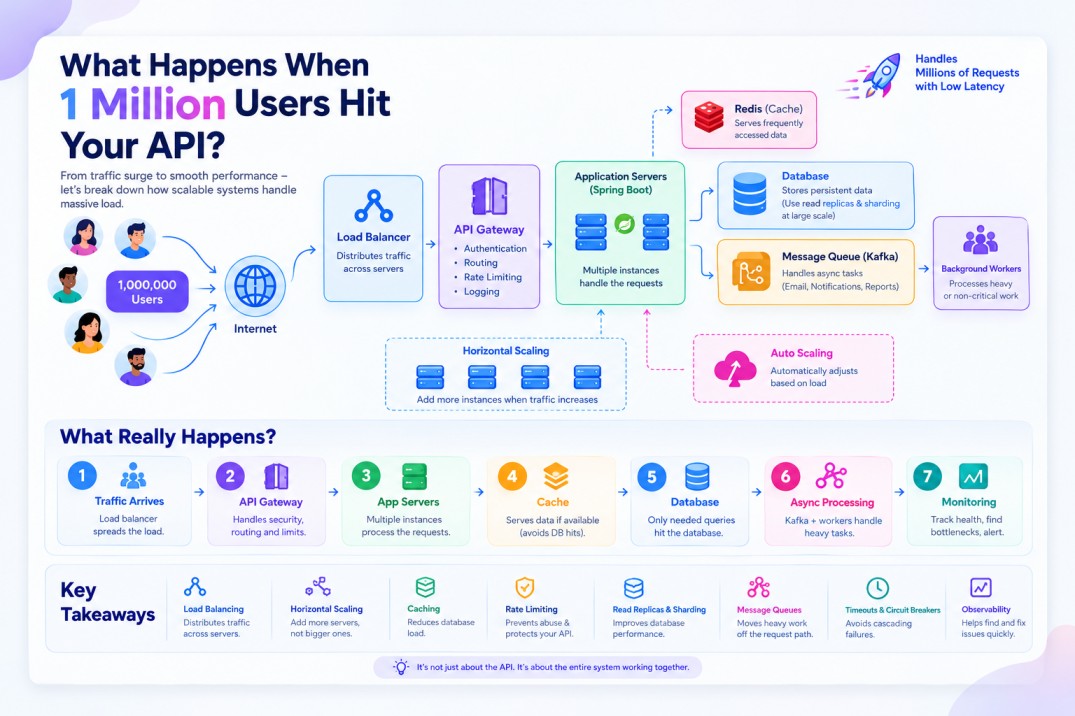
🧩 23. The Complete Architecture
Now let's put everything together.
A simplified large-scale API architecture could look like this:
                         1 Million Users
                                ↓
                         Load Balancer
                                ↓
                          API Gateway
                                ↓
                 ┌──────────────┼──────────────┐
                 ↓              ↓              ↓
              App 1           App 2          App N
                 └──────────────┼──────────────┘
                                ↓
                         Service Layer
                         /            \
                        ↓              ↓
                     Redis          Kafka
                        ↓              ↓
                  Cache Layer     Background
                                    Workers
                                       ↓
                              ┌────────┴────────┐
                              ↓                 ↓
                         Database          Other Services
                              ↓
                       Read Replicas
                              ↓
StorageAnd around everything:
Monitoring + Logging + Tracing↓
Alerts & Dashboards
Now we have a system where different components solve different problems.
🎯 24. What Actually Happens When 1 Million Users Hit Your API?
Let's simplify the entire story.
Step 1 — Traffic Arrives
1 Million Users ↓ Load BalancerTraffic is distributed across multiple servers.
Step 2 — API Gateway
Load Balancer ↓ API GatewayAuthentication, routing and rate limiting can happen here.
Step 3 — Application Servers
Gateway ↓ Multiple Spring Boot InstancesThe application scales horizontally.
Step 4 — Cache
Application ↓ RedisFrequently accessed data can be served quickly.
Step 5 — Database
Only requests that actually need persistent storage reach the database.
Cache Miss ↓ DatabaseStep 6 — Async Processing
Heavy or non-critical work goes to a queue.
Application ↓ Kafka ↓ Background WorkersStep 7 — Monitoring
Everything is monitored.
Metrics Logs Traces AlertsSo when something starts going wrong, engineers can find the bottleneck.
🔥 The Real Bottleneck Is Usually Not Where You Think
Here's the most important lesson.
You might think:
"I need more Spring Boot servers."
Maybe.
But the real bottleneck could be:
Database Redis Network Thread Pool Connection Pool External API Kafka CPU MemoryFor example:
100 Spring Boot Servers ↓ One Database ↓ 💥Adding another 100 application servers won't solve that problem.
This is why good system design starts with:
Find the bottleneck before scaling everything.
🧠 Key Takeaways
When 1 million users hit your API, you don't solve the problem with one magical technology.
You combine multiple techniques:
Load Balancing + Horizontal Scaling + API Gateway + Rate Limiting + Caching + Database Replication + Database Sharding + Asynchronous Processing + Message Queues + Timeouts + Circuit Breakers + Observability + Auto ScalingEach solves a different problem.
Load Balancer
Distributes traffic across multiple application instances.
Horizontal Scaling
Adds more servers instead of relying on one powerful machine.
Caching
Reduces repeated database queries.
Rate Limiting
Prevents clients from overwhelming your API.
Read Replicas
Distribute read-heavy database traffic.
Sharding
Distributes large datasets across multiple databases.
Kafka / Message Queues
Move heavy asynchronous processing away from the request path.
Timeouts
Prevent requests from waiting forever.
Circuit Breakers
Prevent failures from cascading between services.
Observability
Helps engineers find bottlenecks and failures.
💡 Final Thought
A million users don't necessarily mean your API needs a million servers.
The real challenge is understanding where the work is happening.
Start with:
User↓
API
↓
Database
Then ask:
What happens when traffic increases?
Maybe you need:
Load Balancer↓
Multiple APIs
↓
Redis
↓
Database Replicas
↓
Kafka
↓
Background Workers
And when the traffic grows even further:
Multiple Regions Multiple Databases Multiple Caches Multiple ServicesThat's how a simple API gradually evolves into a large-scale distributed system.
And this is one of the most important lessons in System Design:
Don't scale everything blindly. Find the bottleneck, understand why it exists, and scale that part first.